Shareef Tracker — Cross-Project Ticket Tracker
A personal, local-only ticket tracker that gives me one board across every project I work on — with a twist: tickets are pushed in by a Claude Code skill I run inside any repo, so nothing ever scrapes my code. Built to daily-driver quality, with a "Command Deck" board I actually run my own work through. In use locally — contact for project access or more info.
- NestJS
- Prisma
- SQLite
- MinIO
- React
- Vite
- TypeScript
- Tailwind
- Claude Code Skill
Shareef Tracker is a tool I’m building for myself: one board for the tickets across all my projects, without the tracker ever touching those projects’ files. It’s a small system with a deliberate architecture, built to daily-driver quality rather than as a demo — and now the tool I actually run my own work through.
A look at it
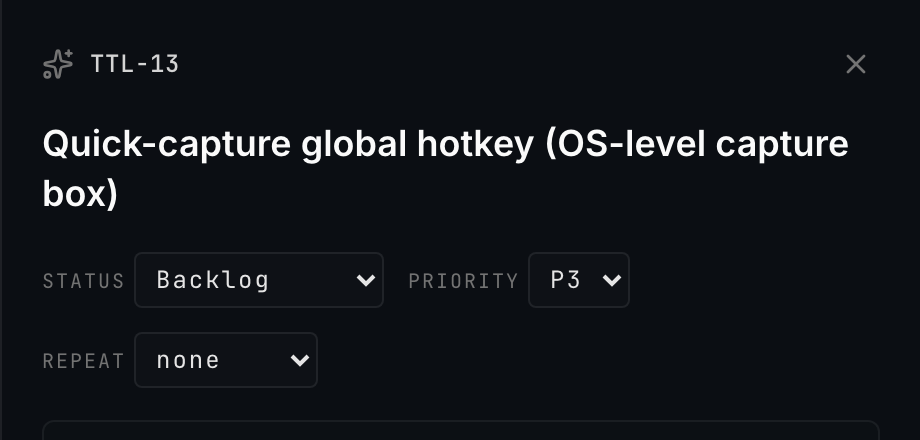
The ticket detail drawer gives every ticket inline status, priority and repeat (recurrence) controls — plus subtasks, git context, a timeline of its created / started / finished stamps with computed durations and an editable deadline, and an append-only activity log with undo:
What it is
A single, local-only board that collects tickets from every repo I work in — grouped by workspace, optional client/product group, and project. It’s built for one person on one machine: fast capture while coding, and one glance to see what’s on fire across everything. No teams, no cloud, no Docker.
The idea — push, don’t scrape
Most cross-project trackers scrape each repo for TODOs. This one inverts that. While I’m working in
any project, I run a global Claude Code skill (todo); the skill — which already has the full
context of what I’m doing — classifies the ticket (type, priority, title, status, labels, workspace,
project), attaches git context, and POSTs it to the tracker’s API. The tracker just stores and
shows it.
That inversion buys a lot: no fragile markdown parsing, no format drift, an LLM that actually understands the work doing the classification — and, most importantly, zero risk of the tracker writing into my real repos. The tracker is hermetic: its only ingress is the API and the UI.
How it’s built
- NestJS + Prisma + SQLite backend — a full REST/JSON API, RBAC built deny-by-default with a local bearer token, and a schema modeling a Workspace ▸ Group ▸ Project ▸ Ticket hierarchy. Capture upserts the whole hierarchy from the repo’s path, mints per-project short IDs, and is idempotent.
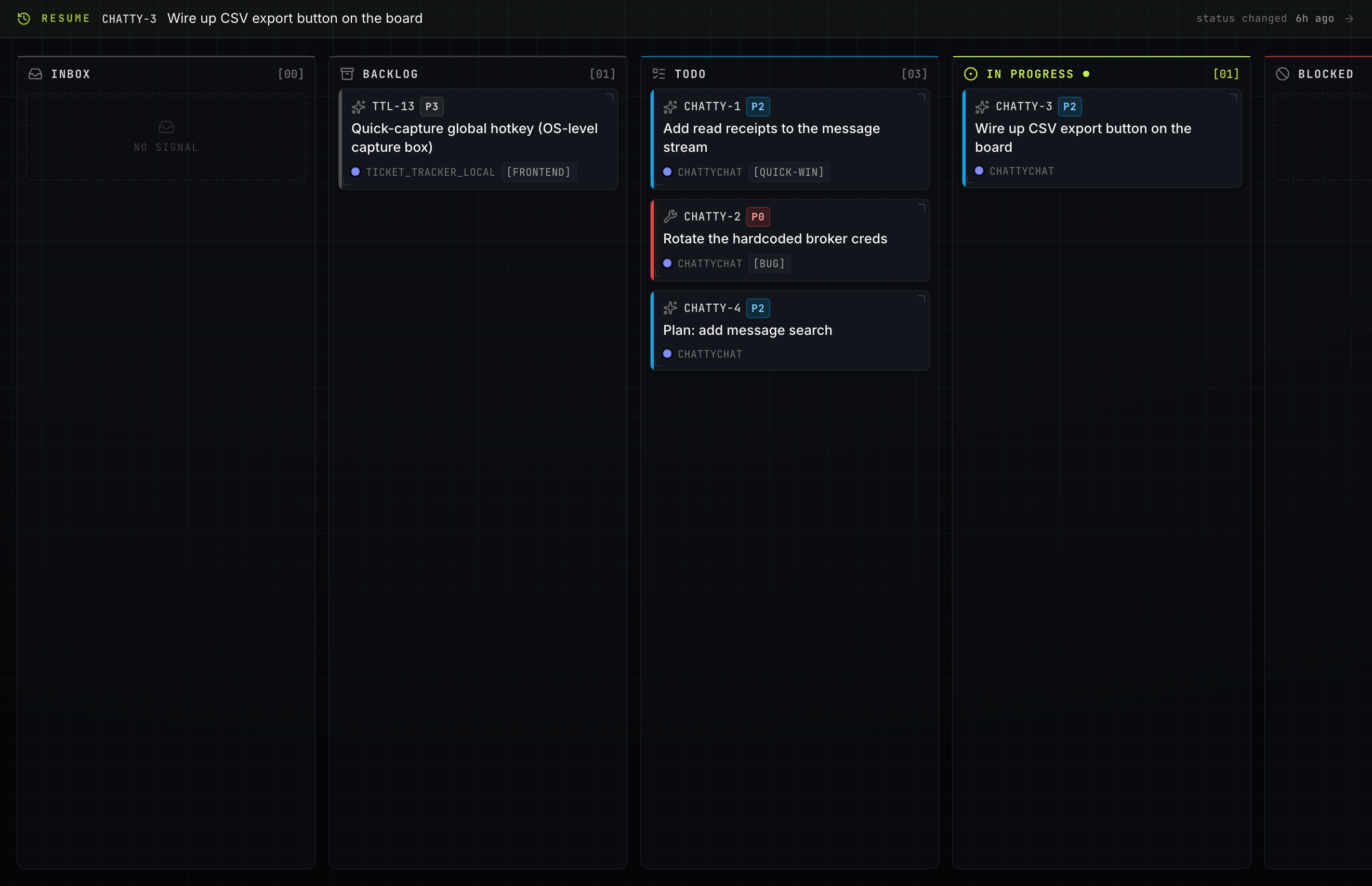
- React + Vite + TypeScript + Tailwind web board — list and kanban views, filters and search, an interactive directory-tree sidebar, a cross-project “on fire” view, drag-and-drop across columns and drag-to-reorder within one, editable subtasks, a ticket detail drawer with the activity log, and a keyboard-driven command palette (⌘K). Per-project health lights (red/amber/green) roll up each project’s open tickets in the sidebar; a “stale” view flags tickets untouched for two weeks; a “resume” banner points me back at what I was last working on; recurring tickets auto-recreate their next occurrence on completion; and I can spin up an ad-hoc project right from the board, no repo required.
- Full board management, in the UI — add and edit workspaces and groups (not just projects) directly from the sidebar, so the whole hierarchy is editable rather than fixed. Every workspace auto-provisions a “General” bucket so a project never floats ungrouped, image/doc attachments can be dropped on any ticket, a ticket can be moved across project / group / workspace from its drawer, and a formatted summary report downloads as Markdown or PDF at any level — from a single ticket up to a whole workspace.
- A “Command Deck” visual identity — the board reads like an instrument panel: a dark ink-and-grid canvas, a single lime accent, a monospace × grotesque type pairing (self-hosted, no CDN), status “channels” as columns and tickets as instrument tiles, with a command-strip top bar. It’s responsive down to a phone — the directory sidebar collapses to an off-canvas drawer with a toggle, and the board goes full-width.
- The
todoskill — the capture side of the contract, resolving which workspace/group/project a repo belongs to from its path and de-duping against open tickets before it creates one. Its v2 addsplan → ticketcapture and a/todo scanthat reads the git log/diff/TODOs to propose tickets. - A global commit-hook — a
post-commitdispatcher that readsfixes TTL-4-style messages and auto-moves the ticket to done, stamping the resolving SHA and branch — across every repo, with zero manual step. - Native, no Docker — SQLite is a file and a local MinIO object store holds attachment blobs
(only a pointer lives in the DB); the whole stack — MinIO, API and board — comes up from a root
Makefile, and a.icsfeed lets me subscribe to due-dated tickets from any calendar app.
Doing it properly
The discipline is the point: an append-only activity log for every status change and edit, fail-loud boundaries so a ticket is never dropped silently, schema changes only through diffed Prisma migrations, secrets via env with fail-fast validation, and data ownership built in (CSV/JSON export, JSON import, timestamped backups). Moving a ticket re-mints its short ID under the new project’s prefix but keeps the old ID as a resolvable alias, so commit messages, URLs, and the auto-close hook that all point at the old ID never break. The Vitest + Supertest harness spans both apps and is order-independent — every spec resets to a base seed so it passes in isolation as well as in the suite. It dogfoods its own tracker to manage its own build.
Where it’s at
Built phase by phase, and now the tool I actually run my own work through — the backend API, the
todo skill end-to-end, the redesigned board UI, the commit-hook auto-close, the calendar feed, and
the quality-of-life layer (health lights, stale aging, resume, recurring tickets, in-board project
creation, full workspace/group management, ticket attachments, cross-project ticket moves, and
Markdown/PDF reports) are all in place and in daily use. What’s left is deliberately post-v1 and
optional: a GitHub-issue source adapter, deployment to a free tier with Postgres and real auth, and
niceties like desktop notifications and a quick-capture hotkey.
It runs on my own machine day to day rather than on a public URL — so if you’d like a closer look or access, contact me to learn more or ask for access.